Bit Font: A Nostalgic Touch for Modern Design
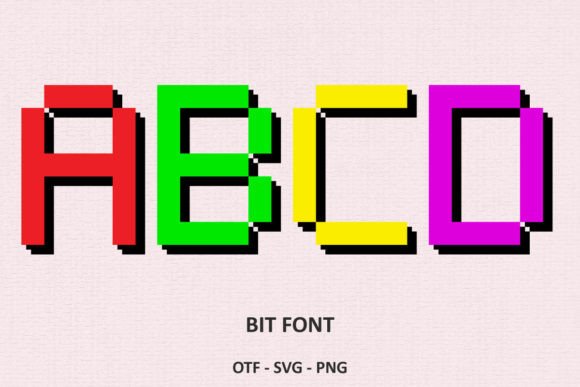
Bit Font is a digital font that brings the charm of 8-bit video game aesthetics into contemporary design. Its pixelated style evokes a sense of nostalgia while offering a fresh, creative edge. Whether you're designing a book cover, a birthday card, or a T-shirt, Bit Font can add a unique, friendly vibe to your projects. With its clean lines and retro appeal, it's an excellent choice for anyone looking to infuse their work with a playful, modern twist.
Designed with versatility in mind, Bit Font is available in both black and color versions. The black version is particularly useful for users who rely on cutting machines like Cricut Design Space. It ensures compatibility and precision, making it ideal for crafting and DIY projects. However, the color version offers a different set of advantages, though it comes with specific software requirements.
Understanding Compatibility Issues with Bit Font
One common mistake when using Bit Font is not checking the compatibility of the file type with the design software or cutting machine you're using. The black version of Bit Font is compatible with most design tools, including Cricut Design Space, which makes it a go-to option for many creators. However, the color version requires more specific software, such as Adobe Photoshop, Illustrator, Silhouette, and Inkscape.
Many users overlook this detail and attempt to use the color version with incompatible programs, leading to frustration and wasted time. For instance, trying to use the OTF or TTF files of the color version with Cricut will result in errors or incomplete designs. This misstep can affect the quality of your final product and may even lead to unnecessary costs if you have to rework your project from scratch.
To avoid these issues, always verify the software requirements before downloading or purchasing Bit Font. If you're unsure about compatibility, consult the Ultimate Font Guide provided by the font’s creator. This resource can help clarify which file types work best with your preferred tools and workflows.
Choosing the Right Version for Your Project
Another consideration when working with Bit Font is selecting the appropriate version based on your project needs. The black version is perfect for projects that require clear, high-contrast text, especially when used with cutting machines. It provides a clean, professional look that works well for logos, labels, and signage.
The color version, on the other hand, adds visual interest and personality to your designs. It's ideal for illustrations, social media graphics, and promotional materials where a bold, eye-catching appearance is essential. However, because of its complexity, it may not be the best choice for all projects. For example, if you're creating a simple greeting card with minimal text, the black version might be more efficient and effective.
Before making a decision, think about the purpose of your design and the tools you'll be using. If you're planning to print your work or use it in a digital format, consider how each version will perform in those environments. Testing the font in your workflow can also help you determine which version suits your needs best.
Best Practices for Using Bit Font
To get the most out of Bit Font, follow a few practical tips that can enhance your design process. First, always download the correct file type for your software. If you're using Cricut, stick with the black version. If you're working in a program like Photoshop or Illustrator, the color version will offer more flexibility and creativity.
Another important step is to test the font in your design before finalizing your work. This helps ensure that it displays correctly and meets your expectations. For example, if you're designing a T-shirt, preview the font in different sizes and colors to see how it looks on fabric. This can prevent costly mistakes and save you time in the long run.
Additionally, familiarize yourself with the font’s characteristics. Bit Font has a distinct style that may not suit every project. If you're aiming for a more traditional or minimalist look, you might want to explore other fonts. However, if you're looking for something quirky and attention-grabbing, Bit Font is an excellent choice.
Where to Find and Use Bit Font
Bit Font is widely available on design marketplaces and font websites. When searching for it, make sure to look for the correct version—black or color—based on your needs. Some platforms may list both versions, while others may only offer one. Always read the product description carefully to avoid confusion.
Once you've downloaded Bit Font, install it properly in your design software. This usually involves opening the font file and following the installation prompts. After installation, you can access the font through your software’s font menu. If you encounter any issues, check the font’s documentation or reach out to the support team for assistance.
For users who are new to digital fonts, the process can seem overwhelming. However, with a little guidance and patience, it becomes much simpler. Start by experimenting with small projects, such as creating a social media post or a digital flyer. As you gain confidence, you can apply Bit Font to more complex designs and larger-scale projects.
Maximizing the Value of Bit Font
Bit Font offers a unique blend of nostalgia and modernity, making it a valuable tool for creators across various industries. Whether you're a designer, marketer, or hobbyist, it can elevate your work and set it apart from the competition. However, to fully benefit from this font, it's essential to understand its capabilities and limitations.
By avoiding common mistakes and following best practices, you can ensure that Bit Font enhances your projects rather than complicates them. Take the time to research, test, and refine your approach, and you'll find that Bit Font can be a powerful asset in your creative toolkit.