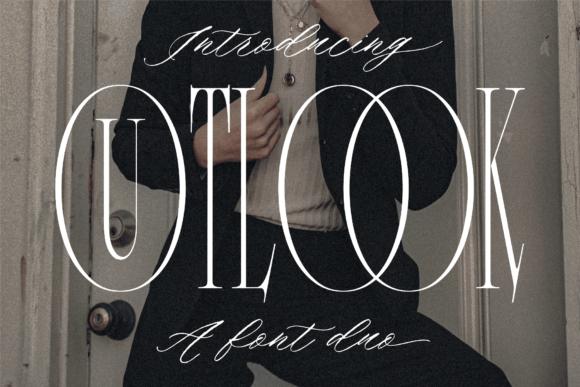
Outlook Font Duo: Where Serif Precision Meets Script Expressiveness
Typography isn’t just about legibility—it’s about resonance. In a digital landscape saturated with generic system fonts and overused display typefaces, designers and communicators are increasingly turning to thoughtfully crafted font duos that offer both structure and soul. Outlook Font Duo stands out precisely because it delivers two distinct yet harmonious voices in one cohesive package: a refined serif for clarity and authority, paired with an elegant script that conveys warmth and intention. It’s not merely decorative—it’s functional duality made tangible.
More Than Two Fonts—A Designed Partnership
What makes Outlook Font Duo different from stacking any serif and script is its intentional pairing. The serif carries subtle calligraphic influences in its stroke modulation and terminal shapes, while the script shares proportional rhythm, x-height alignment, and optical weight balance with its counterpart. This shared DNA means headings set in the script don’t feel like stylistic outliers next to body text in the serif—they feel like natural extensions of the same visual language. That harmony reduces cognitive load for readers and strengthens brand coherence across touchpoints.
Unlike many “duo” fonts released as marketing bundles without typographic synergy, Outlook Font Duo was built for real-world use: from email headers and presentation slides to packaging copy and editorial layouts. Its OpenType features include contextual alternates in the script, small caps and old-style figures in the serif, and seamless cross-font kerning pairs—details that matter when you’re refining a client’s website or polishing a workshop handout.
Why Now? Shifting Expectations in Digital Communication
Over the past five years, audiences have grown more visually literate—and less forgiving of visual dissonance. A blog post with mismatched headline and body fonts, or a startup’s pitch deck using a playful script over a rigid sans-serif, can unintentionally signal incoherence or lack of polish. At the same time, tools like Figma, Canva, and Webflow have democratized design—but haven’t eliminated the need for typographic judgment. Users now expect professional-grade typography without requiring a degree in type design.
Outlook Font Duo meets this moment by offering a ready-made, expertly balanced solution. It supports modern workflows: variable font axes (weight and optical size) in the serif allow responsive scaling across devices, while the script includes ligatures and swashes optimized for both screen readability and print fidelity. For marketers sending newsletters, educators building course modules, or freelancers designing client logos, it removes guesswork—not creativity.
Real-World Use Cases, Not Hypotheticals
- Small business branding: A local ceramics studio uses the script for its logo and product tags (“Hand-thrown in Portland”), then switches to the serif for website copy and care instructions—creating instant recognition without sacrificing readability.
- Educational content: An online course creator applies the serif for lesson summaries and key takeaways, reserving the script for motivational pull quotes and section dividers—guiding attention without overwhelming learners.
- Email marketing: A newsletter designer sets the subject line preview in the script (optimized at 20px for inbox visibility), then uses the serif’s medium weight for body text—achieving personality and scannability in equal measure.
- Print collateral: A nonprofit uses the serif’s light weight for event program notes and the script’s bold swash variant for invitation headlines—maintaining elegance across formats without licensing complications.
Not Just for Designers—A Tool for Clearer Expression
You don’t need to be a typographer to benefit from Outlook Font Duo. If you’ve ever spent 20 minutes toggling between fonts in Google Docs trying to make a proposal “feel right,” or hesitated before choosing a font for your Instagram bio because nothing seemed to match your voice—that hesitation points to a deeper need: tools that support authentic communication, not just aesthetic decoration.
The duo works because it mirrors how we communicate in life: sometimes precise and grounded (the serif), sometimes fluid and personal (the script). Using them together doesn’t mean every project needs both—it means having options that coexist gracefully when needed. A freelancer might use only the serif for client reports but reach for the script when drafting a warm follow-up email. A blogger may apply the script exclusively to podcast episode titles while keeping all article text in the serif. Flexibility here isn’t about abundance—it’s about relevance.
Evolution, Not Revolution
Outlook Font Duo didn’t appear in isolation. It reflects a broader shift away from monolithic font systems toward modular, purpose-built families. We’ve moved past the era where one “versatile” sans-serif was expected to handle everything—from code comments to billboard headlines. Today’s best practices acknowledge that different contexts demand different expressive tools—and that pairing should be intentional, not incidental.
This evolution is visible in how platforms now support font loading strategies: CSS @font-face declarations let developers load only the weights and styles they need; variable fonts reduce HTTP requests; and browser support for font-display properties ensures text remains visible during load. Outlook Font Duo is built with these realities in mind—its web-optimized files are lean, its fallback behavior predictable, and its licensing straightforward for both personal and commercial use.
Practical Considerations Before You Begin
- Start with hierarchy, not flair: Define your primary information layers first (e.g., “What must be read immediately?” vs. “What adds tone?”), then assign fonts accordingly—not the other way around.
- Test contrast and color: The script shines in dark-on-light settings but may require slight tracking adjustment or color desaturation in light-on-dark UIs. Preview at actual size—not just in your design tool.
- Respect reading environments: Long-form body text benefits most from the serif’s even texture and generous counters. Reserve the script for short, high-impact moments—headlines, signatures, or accent labels.
- Check language support: Outlook Font Duo includes Latin-based languages with extended diacritics (French, Spanish, German, Polish, Turkish), but doesn’t cover Cyrillic or CJK. Verify coverage if your audience spans multilingual regions.
Typography choices accumulate. Over months and years, the fonts you return to shape how others perceive your work—not just aesthetically, but in terms of care, consistency, and clarity. Outlook Font Duo earns repeat use not because it’s trendy, but because it solves recurring problems: How do I add humanity without sacrificing professionalism? How do I distinguish voice without breaking flow? How do I stay efficient without compromising quality?
Its versatility isn’t theoretical. It’s visible in the tightened spacing of a conference agenda, the confident alignment of a product label, the quiet confidence of a teacher’s syllabus header. It’s in the way a script initial draws the eye—and the way the serif that follows holds attention. That balance—between presence and precision—is why so many creators, from seasoned art directors to first-time Canva users, keep returning to it. Not as a shortcut, but as a reliable collaborator.
If you’ve been selecting fonts reactively—choosing what looks “nice” in isolation—try approaching them relationally instead. What does your message need *first*: structure or spirit? Authority or approachability? Then ask: which font answers that need, and which complements it without competing? Outlook Font Duo was designed for those questions. And once you’ve used it to resolve one layout, you’ll likely find yourself reaching for it again—not out of habit, but because it simply works.