Pumpkin Font
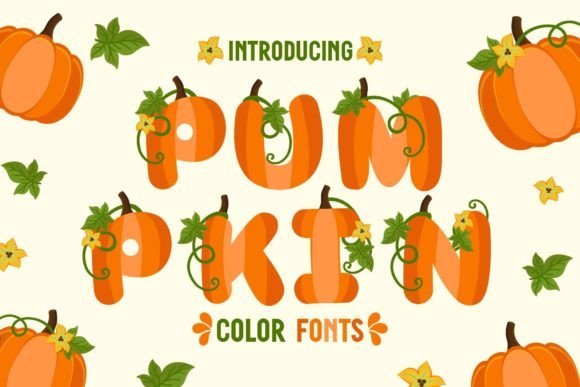
There’s a quiet shift happening in digital design—one where authenticity isn’t just preferred, it’s expected. People scroll past polished, generic visuals in seconds. What stops them? Texture. Warmth. A hint of seasonal honesty. That’s where Pumpkin Font steps in—not as another decorative typeface, but as a tactile, autumnal experience rendered in code. It’s a color font built with OpenType-SVG technology, meaning each glyph carries layered color, subtle gradients, and organic imperfections that mimic hand-carved pumpkins, spiced parchment, or sunlit maple leaves. It doesn’t just say “fall”—it feels like stepping into a crisp October afternoon.
Why a color font—and why now?
Color fonts like Pumpkin Font reflect how design tools and user expectations have matured. Five years ago, adding texture to typography meant stacking layers in Photoshop or manually coloring vectors in Illustrator—time-consuming, inconsistent, and hard to scale. Today, apps like Adobe Photoshop (CC 2020+), Illustrator (2021+), Silhouette Studio (v5.0+), and Inkscape (1.1+) natively support OpenType-SVG. That means designers, small-business owners, and educators can type a word—“Harvest,” “Gather,” “Pumpkin Spice”—and instantly get rich, ready-to-use letterforms with no extra steps. No masking. No swatches. No guesswork.
This isn’t about novelty for novelty’s sake. It’s about efficiency meeting emotional resonance. When a bakery owner designs a Thanksgiving menu, or a teacher crafts a classroom bulletin board for November, they’re not just choosing a font—they’re setting tone, reinforcing brand voice, and honoring context. Pumpkin Font delivers that context inherently: its warm amber strokes, soft shadowing, and slight irregularity signal warmth, tradition, and approachability—all without a single supporting image.
More than Halloween—and deeper than decoration
While Pumpkin Font naturally shines during Halloween (think “Boo!”, “Trick or Treat”, or spooky-but-sweet event posters), its utility extends across the full autumn calendar. It works for cozy coffee shop signage promoting apple cider specials, nonprofit newsletters announcing fall food drives, wedding invitations for October barn receptions, and even educational materials—like a middle-school science unit on seasonal change, where headings in Pumpkin Font subtly reinforce thematic learning.
What makes it adaptable is its balance: it’s expressive but not cartoonish, nostalgic but not dated, festive but not exclusive. Unlike some seasonal fonts that lean heavily into jack-o’-lanterns or candy corn motifs, Pumpkin Font uses color and form to evoke mood—not literal iconography. That gives creators room to layer meaning: pair it with minimalist line art for modern elegance, or set it against grainy kraft paper textures for rustic charm. Its versatility lies in restraint.
Real workflows, real limits
Adopting Pumpkin Font fits seamlessly into many professional pipelines—but only if you know where it works best. Because it’s an OpenType-SVG font, it thrives in vector and raster design environments that support embedded color data. That includes:
- Adobe Photoshop (with Character panel > color font toggle enabled)
- Adobe Illustrator (via Type > Font > select Pumpkin Font; ensure “Preview” is on)
- Silhouette Studio (Designer Edition or higher; use the Text tool and select SVG-compatible fonts)
- Inkscape (1.1+, with “Use system fonts” disabled and SVG font rendering enabled)
It does not work in Cricut Design Space using standard OTF or TTF files—because those formats lack color data. If you’re cutting vinyl or paper with a Cricut machine, you’ll need to convert text to outlines first (in Illustrator or Inkscape), then ungroup and recolor manually. That’s not a flaw—it’s a format boundary, and one clearly documented in resources like the Ultimate Font Guide. Knowing this upfront saves hours of troubleshooting and aligns expectations with technical reality.
Designing with intention—not just aesthetics
Using Pumpkin Font well means treating it as a design decision, not a decoration. Ask yourself: what feeling do I want the viewer to carry away? Calm? Celebration? Nostalgia? Community? The font supports all of those—but only when paired thoughtfully.
For social media posts, try using Pumpkin Font for headlines only, keeping body text in a clean, highly legible sans-serif (like Inter or Lato). This creates visual hierarchy while preserving readability on small screens. For greeting cards, set short phrases (“Thank You”, “Warm Wishes”, “Happy Harvest”) in Pumpkin Font at generous sizes—letting the color and shape breathe. Avoid overloading paragraphs; this is a display font, not a text face. And resist the urge to stretch or distort it—its charm lives in its natural proportions.
Small business owners especially benefit from this clarity. A local florist launching a “Fall Arrangements” promo doesn’t need to commission custom illustrations. One line of text in Pumpkin Font, placed over a neutral background photo of dried wheat or terracotta pots, communicates seasonality, craftsmanship, and care—instantly.
How it fits into broader creative habits
Today’s creators juggle more roles than ever: marketer, designer, writer, community manager. They value tools that reduce friction without sacrificing quality. Pumpkin Font answers that need by compressing multiple design decisions—color choice, texture, seasonal relevance—into a single, reliable asset. It also reflects a larger trend toward *context-aware design*: assets that respond to purpose, audience, and platform—not just aesthetics.
At the same time, users are increasingly sensitive to visual fatigue. Overly saturated templates, aggressive animations, and cluttered layouts wear people out. Pumpkin Font offers an alternative: warmth without noise, character without chaos. Its muted yet vibrant palette (deep oranges, burnt siennas, soft creams) aligns with current preferences for earthy, grounded color systems—seen in everything from interior design blogs to wellness app interfaces.
A note on accessibility and inclusivity
Like any display font, Pumpkin Font should be used with accessibility in mind. Its decorative nature means it’s not suitable for long-form reading, UI labels, or critical information like addresses or deadlines. Use it for headlines, titles, and short emphasis phrases—and always pair it with accessible fallback fonts in your CSS or document styles. Also consider contrast: while its colors are carefully calibrated, background choices matter. Avoid placing it over busy photos or low-contrast neutrals unless you’ve tested readability with real users.
Final thoughts: less about trends, more about resonance
Pumpkin Font won’t replace your core type system—and it shouldn’t. What it does is offer a moment of intentional pause in fast-moving creative work. It reminds us that seasonal design isn’t about checking a box (“add pumpkin icon”) but about evoking shared human experiences: gathering, gratitude, transition, light in shorter days. Whether you’re designing a virtual event banner for a university’s fall speaker series or hand-lettering a thank-you note to a neighbor, Pumpkin Font invites authenticity over automation.
Its growing relevance isn’t tied to a single holiday or algorithm update. It’s rooted in something quieter and more lasting: the desire to make digital spaces feel human again—even down to the shape of a letter.