Magnify Font: A Geometric Sans Serif Built for Clarity and Control
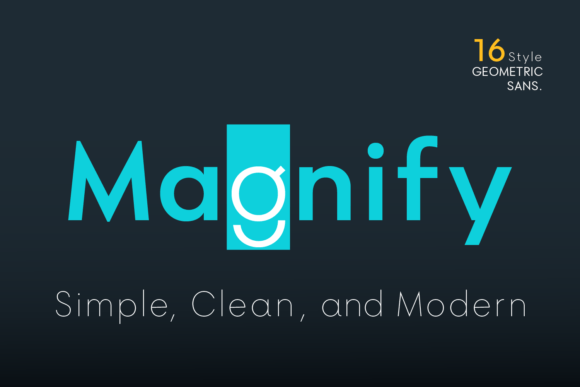
Magnify Font is a geometric sans serif typeface designed with intention—not just aesthetics, but workflow integrity. It emerged from a long-standing desire to bridge the precision of early 20th-century typography (especially Futura, 1927 by Paul Renner—not Bauer, as sometimes misattributed) with contemporary demands for flexibility, legibility, and expressive nuance. The result isn’t a nostalgic replica, but a functional evolution: Magnify balances structural honesty with subtle human variation—most notably in its gently oval letterforms.
Look closely at uppercase O, G, C, Q or lowercase o, a, c, e, and you’ll notice the curves aren’t mathematically circular. They’re slightly stretched vertically—a quiet calibration that improves rhythm in text blocks and softens rigidity in display settings. That small departure from pure geometry makes Magnify feel both grounded and alive, especially at smaller sizes or on lower-resolution screens where perfect circles can appear brittle or uneven.
How Magnify Fits Into Real Creative and Professional Workflows
Fonts don’t exist in isolation—they’re embedded in decisions, tools, timelines, and teams. Magnify Font integrates cleanly at multiple stages of a project lifecycle, whether you’re drafting a pitch deck, designing a brand system, publishing a newsletter, or building a SaaS interface.
Before a project begins, Magnify serves as a strategic anchor. Its 8 distinct weights—from Hairline to Bold—let you define typographic hierarchy *before* writing a single line of copy. You’re not choosing weight on the fly; you’re pre-assigning roles: Hairline for delicate captions, Regular for body text, SemiBold for subheads, Bold for primary headlines. This reduces decision fatigue later and ensures visual consistency across deliverables.
During execution, Magnify’s matching obliques (not faux italics) maintain spacing, contrast, and character integrity when emphasizing text or setting pull quotes. Unlike many geometric fonts whose italics collapse into awkward slants, Magnify’s obliques retain open apertures and balanced proportions—critical when annotating documents, labeling diagrams, or styling interactive elements in Figma or Adobe XD.
After launch or delivery, Magnify supports long-term maintainability. Its OpenType features include stylistic alternates for a, g, y, o—not decorative flourishes, but functional variants that let you adjust tone without switching families. Use the double-story g in formal reports for readability, the single-story version in app UIs for compactness. Swap the rounded o for its more angular alternate in logos where sharpness reinforces brand clarity.
Compatibility and Practical Integration
Magnify works reliably across platforms and environments—no surprises during handoff or export. It renders consistently in modern browsers, CMS editors (like WordPress Gutenberg or Notion), design tools (Figma, Sketch, Illustrator), and even print-ready PDFs. No need for fallback stacks or complex variable font setup unless you want them: Magnify ships as static, well-hinted OTF/TTF files, reducing friction for users who prioritize stability over bleeding-edge tech.
If you use web fonts, Magnify’s file size per weight stays lean—under 40 KB unzipped—so loading performance remains unaffected, even with multiple weights active. Pair it with a neutral serif (e.g., a crisp Didot or Merriweather) for editorial layouts, or keep it monolinear for tech dashboards and minimalist branding. Its x-height is generous but not overwhelming, ensuring strong readability in both UI labels and long-form paragraphs.
Workflow Examples You Can Apply Today
- For educators and course creators: Use Magnify Regular + Oblique for slide decks and handouts. The consistent stroke width and open counters improve scanability for students viewing on laptops or tablets. Alternate characters let you differentiate section headers (with the angular 'o') from body text—subtle, but cognitively helpful.
- For marketers and small business owners: Build your brand guidelines around Magnify’s weight scale. Assign Hairline to taglines, Medium to email subject lines, Bold to hero banners. Because all weights share the same underlying structure, resizing or repurposing assets (e.g., turning a social graphic into a printed flyer) preserves harmony—no re-kerning or re-spacing needed.
- For developers and product teams: Embed Magnify via self-hosted CSS
@font-facerules. Its clean metrics align predictably with CSS line-height and letter-spacing defaults—fewer layout shifts, fewer “why does this look off?” moments during QA. The obliques work natively withfont-style: italic, so semantic HTML stays intact without custom classes. - For writers and bloggers: Enable Magnify in your CMS editor (via custom CSS or plugin). Use the alternates selectively—swap the ‘y’ in your site header for the descender-heavy version to add visual weight, then revert to the standard ‘y’ in body text for neutrality. These micro-adjustments shape reader perception without demanding attention.
What to Consider Before Adopting Magnify
Magnify is purpose-built—not universal. It excels where clarity, scalability, and restrained expression matter most. If your work relies heavily on handwritten, script, or highly decorative tones, Magnify won’t replace those needs—but it *can* provide the stable foundation they sit atop. Think of it as the chassis, not the paint job.
Also consider your audience’s context. Magnify’s low-contrast strokes and even weight distribution make it highly legible in digital interfaces and projected environments—but avoid ultra-thin weights (Hairline, Thin) for body text in low-light or accessibility-critical scenarios. Reserve those for large-format displays or short, high-impact uses.
Finally, test before scaling. Try Magnify in your actual tools—not just specimen sites. Paste real content into your email builder, paste headings into your design system library, preview how the alternates behave in your static site generator. Typography reveals its strengths (and limits) only in situ.
Building Consistency Without Compromise
Consistency in typography isn’t about repetition—it’s about intentionality repeated. Magnify supports that by giving you precise control over variation *within* unity. You don’t need five different fonts to signal hierarchy or mood. With one family, you get calibrated contrast (weight), directional emphasis (obliques), and contextual flavor (alternates).
That reduces asset sprawl. Fewer font files mean faster builds, simpler licensing, easier audits. It also simplifies collaboration: a designer, developer, and writer can all reference “Magnify SemiBold” and know exactly what’s meant—no ambiguity about which “light” variant applies.
Over time, that consistency compounds. Clients recognize your work faster. Readers absorb information more efficiently. Your team spends less time debating type and more time solving real problems. Magnify doesn’t eliminate creative choice—it structures it, so every decision serves the outcome, not the trend.